
Uptick Review
Fire protection inspection and service software built around asset-level compliance records
Fit Score
Fit Score
▸ How we scored Uptick: 9.0/10
| Factor | Weight | Sub-score |
|---|---|---|
| Vertical fit (best trade) | 60% | 10.0/10 |
| Pricing transparency | 20% | 5.0/10 |
| Integration coverage | 20% | 10.0/10 |
Weighted composite, applied identically to every vendor; no vendor pays to change it. Full Fit Score methodology →
WrenchStack may earn a commission or a referral reward if you sign up through a tracked link on this page. The vendor pays it and we add no charge of our own. Neither is an input to the Fit Score or to how we order tools. How we make money.
Quick verdict
Uptick is best for Fire protection and fire and security contractors that inspect large numbers of buildings and assets on recurring schedules and want asset records, deficiency quoting, scheduling and billing in one system. Pricing is quote-only (no published price). Trade fit of 8/10 or higher: Fire Protection & Life Safety.
Reviews on review sites
We do not copy third-party review scores onto this page: they change often and we could not verify them. Read Uptick's current reviews at the source.
About Uptick
Uptick is inspection and service software for fire protection businesses. It started in Australia in 2014, founded by CEO Aidan Lister, and now has offices in Melbourne (Australia and New Zealand), London (UK and Ireland) and Denver (North America). Accel-KKR made a growth investment in Uptick in July 2021, and in August 2023 Uptick acquired FireMate, an Australian fire maintenance software company. Uptick says it has more than 1,200 fire and security customers managing over 2.5 million buildings and 40 million assets.
The product is built around assets. Technicians work from asset lists and digital inspection forms built around local standards, record deficiencies, and send deficiency quotes straight from the field. The iPhone and Android app has an offline mode, so inspections and reports continue without signal. Floorplans help technicians and customers find assets on site.
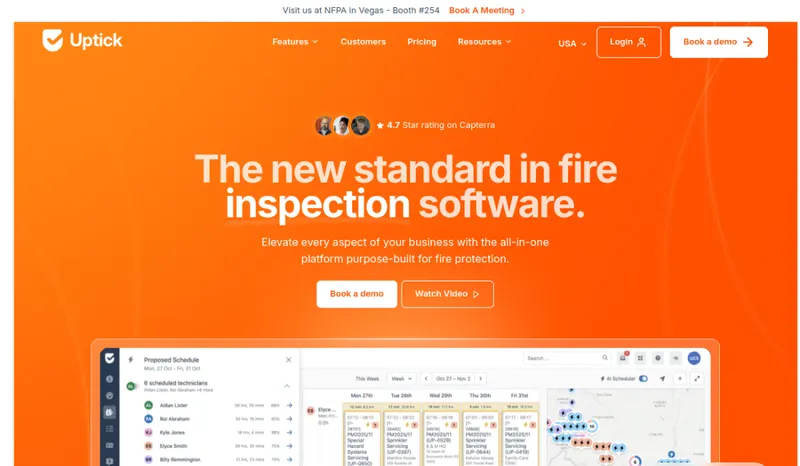
In the office, Uptick handles recurring inspection scheduling, an AI scheduler, route suggestions for technicians, sales quoting for installs and inspections, billing and invoicing, inventory, timesheets, install projects and reports. A customer portal lets clients see the work done on their buildings. Integrations include QuickBooks, Xero, Sage and MYOB for accounting, The Compliance Engine for report submission, and Joyfill, Honeywell and Locatrix.
Uptick does not publish its rate. Its pricing page describes a per-user monthly fee for each desk and field user, with unlimited free customer and subcontractor licenses, monthly invoicing, no annual upfront payment and the option to cancel at any time. The trade-off: Uptick is a deep, asset-level system, and it says most companies can be up and running within two months depending on team size and data migration, so a small shop with simple inspections may find it more than it needs.
Pricing
| Tier | Price | Notes |
|---|---|---|
| Per user (desk and field) | Custom quote |
No rate is published; request a quote. Uptick charges a per-user monthly fee for each desk and field user, and customer and subcontractor licenses are unlimited and free. The platform fee is invoiced monthly with no annual upfront payment, and you can cancel at any time. Uptick says everything needed to run the business is included. Verified against uptickhq.com/us/pricing 2026-09-29.
Uptick does not publish a price, so you need a quote before you can compare it (49 of the 127 tools we list are quote-only). A missing price is not evidence of a high one. Get the quote in writing and confirm what it includes (number of users, integrations, onboarding, support) before you sign.
Pricing verified 2026-09-29. Prices can change, so confirm them with Uptick before purchasing.
What the quote depends on
Number of desk and field users, charged per user each month; customer and subcontractor licenses are free.
Source: uptickhq.com/us/pricing, read 2026-10-08.
Uptick has no published monthly price we can model at your team size, so we do not estimate one: any figure here would be a guess. Ask Uptick for a quote.
Key features
Integrations
Pros
- + Asset-level compliance records
Every building's assets are tracked with their inspection history, and technicians inspect from asset lists with forms built around local standards.
- + Simple billing terms
A per-user monthly fee for desk and field users, invoiced monthly with no annual prepayment and the option to cancel at any time. Customer and subcontractor licenses are free.
- + Works offline in the field
The iPhone and Android app has an offline mode, so technicians can keep inspecting where there is no signal.
- + Office tools in one place
Recurring scheduling, an AI scheduler, route suggestions, sales and deficiency quoting, invoicing, inventory, timesheets, install projects and reports.
- + Established international vendor
Founded in 2014, backed by Accel-KKR since 2021, with offices in Australia, the UK and the US.
Cons
- − No published rate
The pricing model is public but the per-user price is not, so you need a quote for your desk and field headcount.
- − Setup takes planning
Uptick says most companies are up and running within two months, depending on team size and data migration. Plan the move of buildings, assets and schedules early.
- − Depth a small shop may not need
The asset-level structure suits contractors with many buildings and recurring inspections. A small shop with simple jobs may be better served by a lighter tool.
- − QuickBooks version not stated
The integrations page lists QuickBooks without saying whether it supports QuickBooks Online, Desktop or both. Confirm the version you use before you sign.
Implementation
Request a quote for your desk and field user counts; customer and subcontractor logins are free. Plan data migration early: buildings, assets, recurring inspection schedules and billing arrangements. Uptick says most companies are running within two months, depending on team size and data migration. Set up inspection forms for your local standards, load floorplans where they help technicians find assets, and connect your accounting system (QuickBooks, Xero, Sage or MYOB). If your jurisdictions use The Compliance Engine, connect it before the first inspections go out. Train technicians on the mobile app, including offline mode, before go-live.
Best for / Watch out for
Best for
Fire protection and fire and security contractors that inspect large numbers of buildings and assets on recurring schedules and want asset records, deficiency quoting, scheduling and billing in one system
Watch out for
No published per-user rate; a deep, asset-level system that takes planning to set up (Uptick says most companies are running within two months, depending on team size and data migration); more than a small shop with simple inspections may need
Available for these trades
Alternatives to Uptick
Matched on tool type, shared trades, price tier and team size.
Quote-only pricing, so compare on fit not cost; also strong for fire protection & life safety.
Quote-only pricing, so compare on fit not cost; also strong for fire protection & life safety; 14-day free trial.
Quote-only pricing, so compare on fit not cost; also strong for fire protection & life safety.
Quote-only pricing, so compare on fit not cost; stronger hvac specialty fit.
Quote-only pricing, so compare on fit not cost; also strong for fire protection & life safety.
Quote-only pricing, so compare on fit not cost; stronger hvac specialty fit.
User reviews
Write a review →No user reviews yet for Uptick
If you use Uptick, you can write the first review. Every review is moderated by hand before it is published.
Write the first review →Write a review of Uptick
Every review is moderated by hand before it is published, and a review can be declined. If you leave an email address, we may use it to confirm that you use Uptick.
Frequently asked questions
How much does Uptick cost?
Uptick does not publish its rate. It charges a per-user monthly fee for each desk and field user, with free customer and subcontractor licenses, monthly invoicing, no annual upfront payment and the option to cancel at any time. Request a quote for your headcount.
Who owns Uptick and where is it based?
Uptick was founded in Australia in 2014 by CEO Aidan Lister. Accel-KKR made a growth investment in July 2021. It has offices in Melbourne, London and Denver, and in August 2023 it acquired FireMate, an Australian fire maintenance software company.
Does the Uptick app work offline?
Yes. Uptick's iPhone and Android app has an offline mode, so inspections and reports can continue without signal.
What does Uptick integrate with?
QuickBooks, Xero, Sage and MYOB for accounting, The Compliance Engine for compliance reporting, and Joyfill, Honeywell and Locatrix.
How long does Uptick take to set up?
Uptick says most companies can be up and running within two months, depending on team size and how complex the data migration is.
Ready to try Uptick?
No published price: ask Uptick for a quote.
Visit Uptick →Do you build something that competes with Uptick?
We check Uptick against its own website and list the cons next to the pros. If you build a competing product that is not listed here, you can submit it for editorial review. An evaluation can end with or without a listing.
Listings are free. We do not accept payment for inclusion, for placement, for a score, or to remove a documented con. Read this page first and decide whether you want that.