
ServiceTrade Review
Commercial service contractor platform
Fit Score
Fit Score
▸ How we scored ServiceTrade: 8.4/10
| Factor | Weight | Sub-score |
|---|---|---|
| Vertical fit (best trade) | 60% | 9.0/10 |
| Pricing transparency | 20% | 5.0/10 |
| Integration coverage | 20% | 10.0/10 |
Weighted composite, applied identically to every vendor; no vendor pays to change it. Full Fit Score methodology →
WrenchStack may earn a commission or a referral reward if you sign up through a tracked link on this page. The vendor pays it and we add no charge of our own. Neither is an input to the Fit Score or to how we order tools. How we make money.
Quick verdict
ServiceTrade is best for Commercial HVAC/refrigeration/fire-life-safety contractors with recurring service agreements. Pricing is quote-only (no published price). Trade fit of 8/10 or higher: HVAC, Fire Protection & Life Safety, Electrical.
Reviews on review sites
We do not copy third-party review scores onto this page: they change often and we could not verify them. Read ServiceTrade's current reviews at the source.
About ServiceTrade
ServiceTrade is field service software for commercial service contractors (commercial HVAC, refrigeration, fire and life safety, plumbing and other building services) whose business runs on recurring service agreements. It was founded in 2012 by Billy Marshall and Brian Smithwick and is based in Durham, North Carolina.
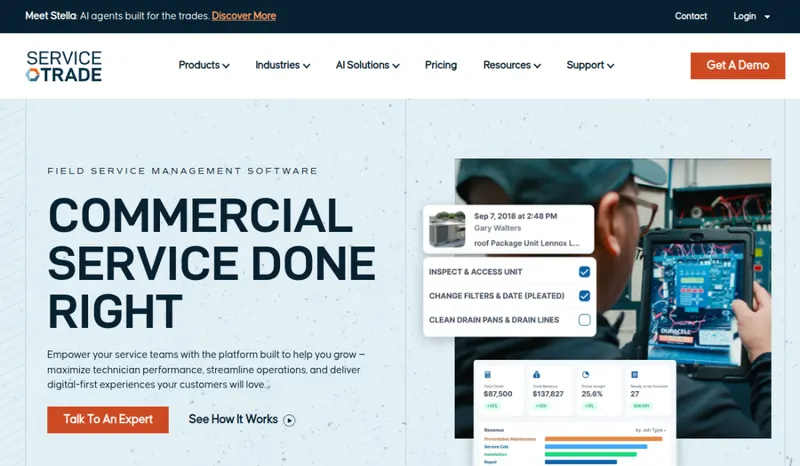
What separates it from general FSM is how it models commercial service. Service agreements generate scheduled visits, every piece of equipment at every site has its own service history, and deficiencies found on inspections and maintenance visits are recorded and turned into quotes, with photos and AI-assisted summaries, for the customer to approve. The Service Portal gives facility managers their work history, asset details, upcoming visits, quotes awaiting approval, invoices and job documents.
ServiceTrade publishes no prices: its Select, Premium and Enterprise suites are quoted, pricing is driven mainly by the number of technicians, and every suite includes an unlimited number of office users. The accounting integrations are broad for an FSM platform: QuickBooks (Online, Online Advanced and Desktop), Sage Intacct and Sage 100, NetSuite, Microsoft Dynamics, Acumatica, Vista, Trimble Spectrum and ComputerEase, plus Avalara for tax and Zapier.
The trade-off: ServiceTrade is built for commercial work. Residential service operations would pay for features they won't use and miss homeowner-focused ones.
Pricing
| Tier | Price | Notes |
|---|---|---|
| Select | Custom quote | |
| Premium | Custom quote | |
| Enterprise | Custom quote |
Custom quote: the Select, Premium and Enterprise suites all show 'Request pricing'. ServiceTrade prices mainly by technician count, plus the suite you choose, and every suite includes unlimited office users. Verified against servicetrade.com/pricing 2026-10-08.
ServiceTrade does not publish a price, so you need a quote before you can compare it (49 of the 127 tools we list are quote-only). A missing price is not evidence of a high one. Get the quote in writing and confirm what it includes (number of users, integrations, onboarding, support) before you sign.
Pricing verified 2026-10-08. Prices can change, so confirm them with ServiceTrade before purchasing.
What the quote depends on
Mainly the number of technicians, plus the suite chosen; office users are unlimited in every suite.
Source: servicetrade.com/pricing, read 2026-10-08.
ServiceTrade has no published monthly price we can model at your team size, so we do not estimate one: any figure here would be a guess. Ask ServiceTrade for a quote.
Key features
Integrations
Pros
- + Built around commercial service agreements
Service agreements generate scheduled visits and recurring work, the way commercial maintenance contracts actually run, instead of forcing them into residential job templates.
- + Deficiencies turned into quotes
Deficiencies recorded on inspections and maintenance visits become quotes, with photos and AI-assisted summaries, that customers can approve.
- + Asset-level service history
Every piece of equipment at every customer site has its own record and service history, which commercial facility work depends on.
- + Service Portal for facility managers
Customers see work history, asset details, upcoming visits, quotes awaiting approval, invoices and job documents in one portal.
- + Broad accounting integrations
QuickBooks (Online, Online Advanced, Desktop), Sage Intacct, Sage 100, NetSuite, Microsoft Dynamics, Acumatica, Vista, Trimble Spectrum and ComputerEase, which suits commercial contractors with heavier accounting needs.
- + Unlimited office users
ServiceTrade says pricing is driven mainly by the number of technicians, and every suite includes an unlimited number of office users, so your plan does not cap dispatchers and admins.
Cons
- − Commercial-only (wrong fit for residential)
Residential service contractors won't use service agreements, deficiency workflows or asset-level histories the way commercial shops do. Residential-focused operations should evaluate Housecall Pro, FieldEdge or ServiceTitan instead.
- − Plan training time for non-commercial teams
If your office staff come from residential FSM, budget training time for the service-agreement and deficiency workflows.
- − No published pricing
All three suites say "Request Pricing", so you need a sales conversation to get a number for your technician count.
- − No free trial
Evaluation runs through demos with the sales team rather than a self-serve trial.
- − Migrating agreements takes work
Moving service agreements and building the asset library are the longest steps in a commercial rollout, especially coming from a platform that models jobs rather than agreements.
Implementation
Treat a commercial rollout as a project. Configure the system and import customers and properties first, then migrate service agreements (the hardest step, because agreement data rarely maps cleanly between platforms), then build the asset library, since every piece of equipment at every site needs a record. Train office staff on agreements and the deficiency-to-quote workflow, then field techs on the mobile app and deficiency capture, and finally launch the Service Portal to customers and connect your accounting system.
Best for / Watch out for
Best for
Commercial HVAC/refrigeration/fire-life-safety contractors with recurring service agreements
Watch out for
Not designed for residential; plan training time on its service-agreement and deficiency workflows
Available for these trades
Alternatives to ServiceTrade
Matched on tool type, shared trades, price tier and team size.
Quote-only pricing, so compare on fit not cost; stronger plumbing specialty fit.
Quote-only pricing, so compare on fit not cost.
Quote-only pricing, so compare on fit not cost; also strong for hvac.
Quote-only pricing, so compare on fit not cost; stronger fire protection & life safety specialty fit; 14-day free trial.
Publishes its price: from $44.92 per route a month; 14-day free trial.
Quote-only pricing, so compare on fit not cost; also strong for hvac.
User reviews
Write a review →No user reviews yet for ServiceTrade
If you use ServiceTrade, you can write the first review. Every review is moderated by hand before it is published.
Write the first review →Write a review of ServiceTrade
Every review is moderated by hand before it is published, and a review can be declined. If you leave an email address, we may use it to confirm that you use ServiceTrade.
Frequently asked questions
Can ServiceTrade handle residential service operations?
Technically yes, but it's the wrong fit. ServiceTrade's core features (service agreements, deficiency tracking, asset hierarchies, facility-manager portals) are built for commercial workflows. Residential operations should evaluate Housecall Pro, FieldEdge, ServiceTitan, or Jobber instead. Mixed residential-commercial operations typically run two platforms or compromise with general FSM.
How does ServiceTrade compare to ServiceTitan?
ServiceTrade is built for commercial service contractors with recurring agreements, deficiency workflows and a facility-manager portal. ServiceTitan serves residential and commercial trades with deeper marketing and residential sales tools. Neither publishes prices, so get written quotes from both. For commercial-only service work, ServiceTrade is the more focused fit; for mixed residential and commercial work, ServiceTitan covers both.
What's the deficiency-tracking workflow?
Field techs record deficiencies during inspections and maintenance visits (failed equipment, code issues, recommended replacements). ServiceTrade turns them into quotes, with photos and AI-assisted summaries, that facility managers can review and approve, including through the Service Portal.
Does ServiceTrade integrate with Sage Intacct or NetSuite?
Yes. ServiceTrade integrates with Sage Intacct and NetSuite (syncing customers, items, jobs, AR invoices, payments and clock events), and also with QuickBooks, Sage 100, Microsoft Dynamics, Acumatica, Vista, Trimble Spectrum and ComputerEase.
Is ServiceTrade worth it for a 20-tech commercial HVAC operation?
It is built for exactly that kind of shop. Pricing is driven mainly by technician count, and every suite includes an unlimited number of office users, so get a written quote for your 20 technicians and weigh it against the time your office spends on agreements, deficiency follow-up and customer updates today.
Ready to try ServiceTrade?
No published price: ask ServiceTrade for a quote.
Visit ServiceTrade →Do you build something that competes with ServiceTrade?
We check ServiceTrade against its own website and list the cons next to the pros. If you build a competing product that is not listed here, you can submit it for editorial review. An evaluation can end with or without a listing.
Listings are free. We do not accept payment for inclusion, for placement, for a score, or to remove a documented con. Read this page first and decide whether you want that.