
Workyard Review
GPS time tracking and workforce management for construction and trades
Fit Score
Fit Score
▸ How we scored Workyard: 8.8/10
| Factor | Weight | Sub-score |
|---|---|---|
| Vertical fit (best trade) | 60% | 8.0/10 |
| Pricing transparency | 20% | 10.0/10 |
| Integration coverage | 20% | 10.0/10 |
Weighted composite, applied identically to every vendor; no vendor pays to change it. Full Fit Score methodology →
WrenchStack may earn a commission or a referral reward if you sign up through a tracked link on this page. The vendor pays it and we add no charge of our own. Neither is an input to the Fit Score or to how we order tools. How we make money.
Quick verdict
Workyard is best for Construction and trades contractors that want GPS-based labor tracking and job costing to feed payroll, alongside their FSM. Pricing starts at $6/user/mo. Trade fit of 8/10 or higher: General Contractors. 14-day free trial available.
Reviews on review sites
We do not copy third-party review scores onto this page: they change often and we could not verify them. Read Workyard's current reviews at the source.
About Workyard
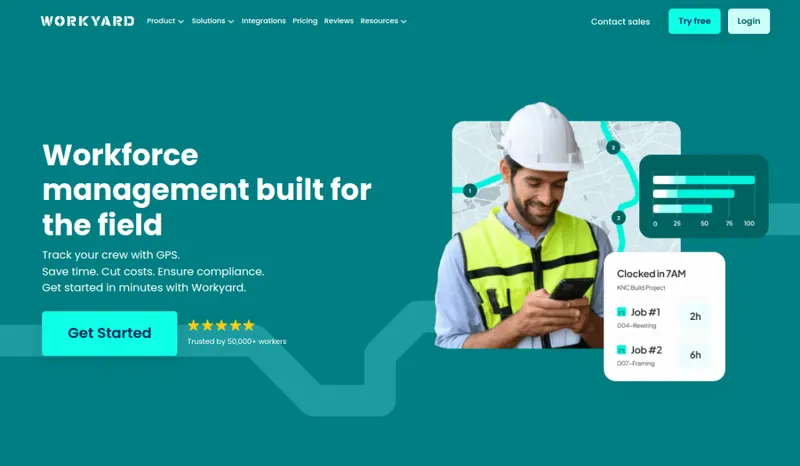
Workyard is a GPS-based workforce management platform for construction and skilled trades: the tool you add to track field labor by job before payroll runs. Workyard says it has offices in Sydney and San Francisco. Its about page says the founders launched a staffing business for contractors in 2017, where they learned how hard it was to track time for workers in the field. It focuses on time tracking with GPS and geofenced clock-ins, crew scheduling, and job costing.
For a trades business, Workyard records which employee was on which job and for how long, so labor can be costed to the right job before payroll runs. GPS-tracked hours, coded by job and cost code at clock-in, go to payroll and accounting. Workyard's pricing page lists one-click payroll export to QuickBooks Online, QuickBooks Desktop, ADP and Gusto on every plan. Pro adds project and cost code sync with your accounting system, Autopilot adds automatic ERP sync (Workyard names Sage, NetSuite, ComputerEase and Foundation) and a developer API, and Enterprise adds custom integrations. Workyard's integrations page also lists Paychex, Rippling, Sage 300 CRE, Sage Intacct and Spectrum ERP, and its help center has a guide to integrating with Procore.
The key thing to understand is scope: Workyard is time tracking and scheduling, not a full FSM. It doesn't do invoicing, CRM or customer-facing workflows the way Jobber or ServiceTitan do. Pricing is per user, with plans starting at $6 per user per month billed annually (Workyard publishes only that starting rate), and there is a 14-day free trial.
Pricing
| Tier | Price | Notes |
|---|---|---|
| Starter | See pricing note | |
| Pro | See pricing note | |
| Autopilot | See pricing note | |
| Enterprise | See pricing note |
Plans start at $6 per user/month billed annually; monthly billing is also available. Tiers: Starter, Pro, Autopilot and Enterprise (contact sales); Workyard publishes only the $6 starting rate. 14-day free trial, no credit card required. Verified against workyard.com/pricing 2026-09-10.
Workyard starts at $6/user/mo. That is a per-seat price, so the bill grows as you add seats; check the pricing note for what counts as a seat, seat minimums and plan limits. Its starting price places it in our entry price band (under $100 per user per month). None of its 4 tiers has a price in our table; see the pricing note. 14-day free trial.
Pricing verified 2026-09-10. Prices can change, so confirm them with Workyard before purchasing.
Switching from another tool? Estimate the 12-month cost of switching →
Key features
Integrations
Pros
- + GPS-verified labor tracking
GPS tracking gives a breakdown of the sites each worker visited, and from the Pro plan, clock-ins can be restricted to job-site geofences.
- + Job costing by cost code
Crews pick a cost code at clock-in, and from the Pro plan labor costs calculate automatically with reporting by project and cost code, so you see labor cost per job before payroll runs.
- + Payroll and accounting exports
Workyard's pricing page lists one-click export of time to QuickBooks Online, QuickBooks Desktop, ADP, Gusto and other payroll systems on every plan, so payroll doesn't need re-keying.
- + Construction ERP sync from Autopilot
The Autopilot plan adds automated sync with ERP systems (Workyard names Sage, NetSuite, ComputerEase and Foundation) and a developer API, and Enterprise adds custom integrations. Workyard's integrations page also lists Sage 300 CRE, Sage Intacct, Spectrum ERP, Rippling and Paychex, and its help center has a Procore integration guide.
- + Built for construction and trades crews
Workyard describes itself as workforce management software built for the field, for specialty contractors and self-performing general contractors, with geofencing, scheduling and job costing for crews on job sites.
Cons
- − Not a full FSM
Workyard is time tracking and scheduling, not field service management. It lacks invoicing, CRM and customer-facing workflows, so you'll run it alongside an FSM, not instead of one.
- − Review automatic clock-ins before payroll
Automatic clock-in (Autopilot plan) starts a time card when a phone is detected entering a project geofence. Workyard's help center says the app keeps the worker clocked in only if they stay inside the geofence for over 5 minutes, and otherwise the time card might be deleted on its own. A worker who entered a geofence without working can delete the time card. Draw geofences carefully at setup and review time cards before payroll.
- − Per-user pricing adds up
Plans start at $6/user/month (billed annually) and Workyard publishes only that starting rate, so cost scales with crew size and sits on top of whatever FSM you also pay for; confirm your plan's per-user rate before committing (only Enterprise is marked contact-sales) and model the combined stack cost.
- − Not a project-management platform
Workyard's plans cover time tracking, scheduling, task management and job costing, with Smart Forms as an add-on. Its pricing page lists no RFIs, submittals, drawings or budgets, so use a project-management platform such as Procore for those.
- − Adds another tool to the stack
Because it's a focused layer, Workyard means another login and another vendor alongside your FSM and accounting. It adds a layer rather than consolidating tools.
Implementation
Workyard deploys as a focused layer: set up your jobs and cost codes, draw geofences around job sites, add crew members, and connect your payroll or accounting system (QuickBooks, ADP, Gusto and others on any plan; automated ERP sync from the Autopilot plan). The main adoption work is getting crews comfortable with the mobile app and clock-in flow and tuning geofences so automatic clock-ins are accurate. Because Workyard complements rather than replaces your FSM, decide up front how job and labor data will flow between Workyard, your FSM and your payroll system.
Best for / Watch out for
Best for
Construction and trades contractors that want GPS-based labor tracking and job costing to feed payroll, alongside their FSM
Available for these trades
Alternatives to Workyard
Matched on tool type, shared trades, price tier and team size.
Starts at $25 a month base, more as users are added.
Starts at $29 a month base, more as users are added; stronger hvac specialty fit.
Starts at $208 a month for the company; stronger hvac specialty fit.
Starts at $44.92 per route a month.
Starts at $85 a month for the company.
Starts at $47 per user a month.
User reviews
Write a review →No user reviews yet for Workyard
If you use Workyard, you can write the first review. Every review is moderated by hand before it is published.
Write the first review →Write a review of Workyard
Every review is moderated by hand before it is published, and a review can be declined. If you leave an email address, we may use it to confirm that you use Workyard.
Frequently asked questions
Is Workyard a full field-service platform?
No. Workyard is GPS time tracking, scheduling and job costing (a workforce-management layer), not a full FSM. It doesn't handle invoicing, CRM or customer-facing workflows, so if you need those, run it alongside an FSM such as Jobber, Housecall Pro or ServiceTitan.
How much does Workyard cost?
Plans start at $6 per user per month billed annually, with monthly billing also available; Workyard publishes only that starting rate across its Starter, Pro, Autopilot and Enterprise tiers. There's a 14-day free trial with no credit card required. Since it's on top of your FSM, factor the combined cost when deciding.
How is Workyard's time tracking different from my FSM's?
Workyard describes itself as workforce management software built for the field. Crews pick a cost code at clock-in, GPS records the sites they visit, geofence clock-in rules start on the Pro plan and automatic clock-in on Autopilot, and time exports to payroll systems such as QuickBooks, ADP and Gusto. Compare that with the time tracking your FSM already includes before adding another tool.
How do automatic clock-ins work?
On the Autopilot plan, Workyard clocks a worker in when the phone is detected entering a project geofence. Its help center says the app keeps the worker clocked in only if they stay inside the geofence for over 5 minutes, and otherwise the time card might be deleted on its own. A worker who entered a geofence without working can delete the time card. Draw geofences carefully and review time cards before payroll.
Who should use Workyard?
Construction and trades contractors with field crews who need GPS labor tracking and job costing to feed payroll, and who are fine running it alongside their FSM. Solo operators or businesses that just need basic time tracking may be fine with what their FSM already includes.
Ready to try Workyard?
Pricing starts at $6/user/mo. 14-day free trial. The pricing note records that no credit card is needed.
Visit Workyard →Do you build something that competes with Workyard?
We check Workyard against its own website and list the cons next to the pros. If you build a competing product that is not listed here, you can submit it for editorial review. An evaluation can end with or without a listing.
Listings are free. We do not accept payment for inclusion, for placement, for a score, or to remove a documented con. Read this page first and decide whether you want that.