
KnowHow Review
AI-powered knowledge and training platform for trade service companies and franchise networks
Fit Score
Fit Score
▸ How we scored KnowHow: 5.2/10
| Factor | Weight | Sub-score |
|---|---|---|
| Vertical fit (best trade) | 60% | 7.0/10 |
| Pricing transparency | 20% | 5.0/10 |
| Integration coverage | 20% | 0.0/10 |
Weighted composite, applied identically to every vendor; no vendor pays to change it. Full Fit Score methodology →
WrenchStack may earn a commission or a referral reward if you sign up through a tracked link on this page. The vendor pays it and we add no charge of our own. Neither is an input to the Fit Score or to how we order tools. How we make money.
Quick verdict
KnowHow is best for Restoration companies and multi-location trade franchisors that want to turn their procedures into mobile, multilingual training and on-the-job answers for field crews. Pricing is quote-only (no published price).
Reviews on review sites
We do not copy third-party review scores onto this page: they change often and we could not verify them. Read KnowHow's current reviews at the source.
About KnowHow
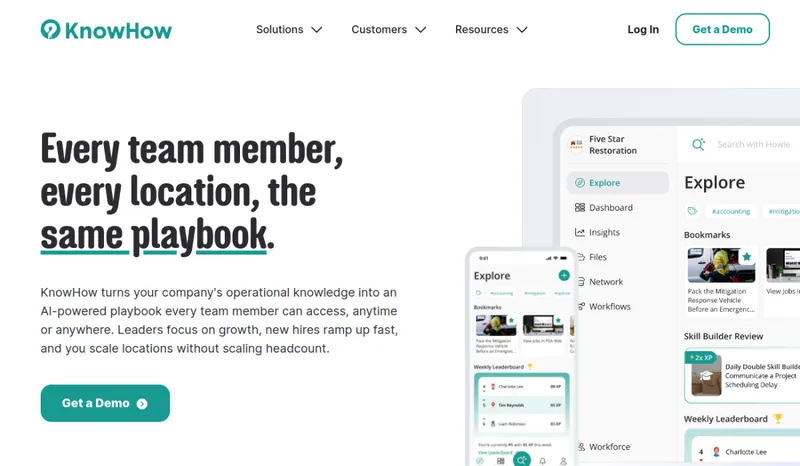
KnowHow is a knowledge and training platform for trade service companies. It is run by Manifest Labs Inc., which does business as KnowHow from Calgary, Alberta, Canada, and its CEO is Leighton Healey. In its press releases KnowHow describes itself as an AI-powered platform that helps restoration companies accelerate workforce productivity by centralizing procedures and best practices in a mobile-first app. KnowHow says more than 10,000 frontline employees use it.
The product has three parts. Define turns how your best people work into a written standard: record a process on desktop, with a Chrome extension or on a phone and KnowHow's AI turns it into a structured step-by-step guide, or type the name of a process and the AI drafts most of the guide for you to edit. Train gives each role a structured training path with auto-generated multiple-choice and true/false quizzes, spaced repetition, badges and a real-time view of who is progressing and who needs coaching. Execute lets crews ask questions in plain language and get answers drawn from your company's own content rather than the public internet. Howie, KnowHow's AI assistant, can also answer from uploaded manuals and documents, a feature KnowHow calls Magic Docs.
Content is translated automatically into 14 or more languages and works on desktop, tablet and smartphone and in Chrome. The iPhone and iPad app requires iOS 16.4 or later, according to its App Store listing, whose release notes list an offline mode. KnowHow also offers reporting and documentation features aimed at compliance. For franchisors, Network Mode sends the brand playbook to every location while leaving room for local additions. KnowHow is an affinity partner of the Restoration Industry Association, with special pricing for RIA members.
Customers shown on its site include FRSTeam, PuroClean, ATI Restoration, EverLine, Thomasville Restoration, Paul Davis Restoration of the Mountain West, Alpine Cleaning & Restoration and Restoration 1, which rolled KnowHow out to its franchisees. KnowHow announced partnerships with PuroClean in January 2026 and Rainbow Restoration in February 2026. Pricing is not published; KnowHow sells through demos, and its Master Subscription Agreement bills implementation separately from the subscription. Its terms say subscriptions are billed monthly, quarterly or annually in advance, cannot be cancelled during the active term and are non-refundable.
The trade-off: KnowHow handles people and process, not jobs, estimates or invoices, so it sits alongside restoration job management software such as DASH, Albi or PSA rather than replacing it. Its site lists no integrations with those systems, pricing requires a sales call, implementation is billed on top of the subscription, and the payoff depends on someone keeping procedures current and crews actually using the app.
Pricing
| Tier | Price | Notes |
|---|---|---|
| Custom quote | Custom quote |
No public pricing. KnowHow's site has no pricing page (tryknowhow.com/pricing returns not found) and directs buyers to book a demo for a quote. Its partners page says Restoration Industry Association members get exclusive pricing. Its Terms of Use (last updated April 27, 2026) say services are billed monthly, quarterly or annually in advance, fees are non-refundable, subscriptions are non-cancellable during the active term, and current fees for registered users are shown in the account's billing settings; monthly subscriptions must be cancelled before the renewal date and quarterly or annual ones at least 30 days before it. Implementation services carry a separate fee from the platform subscription (the Master Subscription Agreement says they are invoiced on signing unless the order form says otherwise), and the amount is not published. Under the Master Subscription Agreement the term is set in each order form, renews for the same length unless either side gives 30 days' written notice, and allows no early termination. The Terms also say KnowHow occasionally offers a free trial of a length it decides; its marketing pages offer demos, not a trial. Verified against tryknowhow.com (home page, terms.html, msa.html, resources/partners.html) 2026-10-22.
KnowHow does not publish a price, so you need a quote before you can compare it (49 of the 127 tools we list are quote-only). A missing price is not evidence of a high one. Get the quote in writing and confirm what it includes (number of users, integrations, onboarding, support) before you sign.
Pricing verified 2026-10-22. Prices can change, so confirm them with KnowHow before purchasing.
KnowHow has no published monthly price we can model at your team size, so we do not estimate one: any figure here would be a guess. Ask KnowHow for a quote.
Key features
Integrations
Pros
- + Turns know-how into written standards
Record a process on video or type its name, and KnowHow's AI drafts a structured step-by-step guide you can edit, so owners do not start every SOP from a blank page.
- + Structured training with checks
Role-based training paths come with auto-generated quizzes, spaced repetition, badges and a live view of who needs coaching.
- + Answers from your own content
Crews ask questions in plain language and get answers from your procedures and uploaded manuals through the Howie AI assistant, not from the public internet.
- + Multilingual and mobile
Procedures are translated automatically into 14 or more languages and work on phones, tablets and computers, and the iPhone and iPad app's release notes list an offline mode.
- + Built for franchise networks
Network Mode pushes one brand playbook to every location. Restoration 1, PuroClean, Rainbow Restoration and FRSTeam are among the franchise brands KnowHow names.
Cons
- − Not job management
KnowHow does not schedule jobs, write estimates or invoice. You still need a job management platform such as DASH, Albi or PSA alongside it.
- − No public pricing
There is no pricing page (tryknowhow.com/pricing returns not found); you need a demo and a quote to learn the cost for your team, and implementation services are billed separately from the subscription, with no amount published.
- − No cancelling mid-term
KnowHow's Terms of Use say subscriptions are non-cancellable during the active term and fees are non-refundable. Monthly plans must be cancelled before the renewal date and quarterly or annual plans at least 30 days before it, and the Master Subscription Agreement permits no early termination.
- − No listed integrations
KnowHow's site does not list integrations with job management, HR or accounting software, so content and users are managed inside KnowHow.
- − Content needs an owner
AI drafts and translations speed things up, but someone has to review procedures and keep them current for the answers to stay right.
- − Restoration-focused library
Most named customers and partners are restoration and franchise brands. Companies in other trades should check how well it fits their work in the demo.
Implementation
Book a demo to get a quote for your team size, and mention RIA membership if you have it. Ask for the implementation fee, billing term and renewal date in the order form, since implementation is billed separately, subscriptions cannot be cancelled during the term and quarterly or annual plans need 30 days' notice before renewal. Start with the procedures new hires need first: record your best techs doing them or let the AI draft them from a title, then edit each guide to match how your company works. Upload existing manuals so Howie can answer from them. Build a training path for each role with its quizzes, then roll the app out to crews on their phones, tablets or computers in their preferred language. Name one person to keep procedures current. Franchisors can use Network Mode to send the brand playbook to each location.
Best for / Watch out for
Best for
Restoration companies and multi-location trade franchisors that want to turn their procedures into mobile, multilingual training and on-the-job answers for field crews
Watch out for
A training, SOP and knowledge tool, not job management or estimating software, so it runs alongside your operations platform; no public pricing, and implementation is billed separately; subscriptions cannot be cancelled during the term and fees are non-refundable; no software integrations are listed
Available for these trades
Alternatives to KnowHow
Matched on tool type, shared trades, price tier and team size.
Quote-only pricing, so compare on fit not cost; 14-day free trial.
Quote-only pricing, so compare on fit not cost.
Quote-only pricing, so compare on fit not cost.
Has a free tier; 14-day free trial.
Quote-only pricing, so compare on fit not cost.
Has a free tier; 7-day free trial.
User reviews
Write a review →No user reviews yet for KnowHow
If you use KnowHow, you can write the first review. Every review is moderated by hand before it is published.
Write the first review →Write a review of KnowHow
Every review is moderated by hand before it is published, and a review can be declined. If you leave an email address, we may use it to confirm that you use KnowHow.
Frequently asked questions
What is KnowHow?
KnowHow is a knowledge and training platform for trade service companies, mainly restoration businesses and franchise networks. It turns company procedures into step-by-step guides, trains staff with role-based paths and quizzes, and answers field questions from your own content through an AI assistant called Howie.
How much does KnowHow cost?
KnowHow does not publish pricing. You book a demo to get a quote. Its partners page says Restoration Industry Association members get exclusive pricing. Implementation services are billed separately from the subscription and invoiced on signing unless the order form says otherwise. Its terms say billing is monthly, quarterly or annually in advance and fees are non-refundable.
Can I cancel a KnowHow subscription?
Not during the term. KnowHow's Terms of Use say subscriptions are non-cancellable during the active subscription term. To stop a renewal, cancel a monthly subscription before its renewal date, or a quarterly or annual one at least 30 days before renewal, by contacting a KnowHow representative or adjusting seats in the billing section. Closing your account does not by itself cancel a paid subscription, and fees are non-refundable.
Does KnowHow replace my restoration job management software?
No. KnowHow covers training, procedures and on-the-job answers. It runs alongside job management software such as DASH, Albi or PSA, and its site lists no integrations with them.
What languages and devices does KnowHow support?
Procedures are translated automatically into 14 or more languages. KnowHow says it works on desktop, tablet and smartphone and in Chrome. Its iPhone and iPad app requires iOS 16.4 or later, according to the App Store listing, and the app's release notes list an offline mode. KnowHow's site does not name Android, so ask about Android devices in the demo.
Who uses KnowHow?
KnowHow says more than 10,000 frontline employees use it. Customers shown on its site include FRSTeam, PuroClean, ATI Restoration, EverLine, Thomasville Restoration and Restoration 1.
Who makes KnowHow?
KnowHow is run by Manifest Labs Inc., based in Calgary, Alberta, Canada. Leighton Healey is the CEO.
Ready to try KnowHow?
No published price: ask KnowHow for a quote.
Visit KnowHow →Do you build something that competes with KnowHow?
We check KnowHow against its own website and list the cons next to the pros. If you build a competing product that is not listed here, you can submit it for editorial review. An evaluation can end with or without a listing.
Listings are free. We do not accept payment for inclusion, for placement, for a score, or to remove a documented con. Read this page first and decide whether you want that.